




Liquor Store Holiday Playbook: 8 Sales-Boosting Strategies
“Customer segmentation” may sound like something reserved for national chains — but that couldn’t be further from the case, especially for liquor stores in 2026.
Likely, you already have everything you need within your point of sale (POS) system. But the difference between glancing at reports and actually using them comes down to strategy.
This article shows you how to assess and interpret existing POS data to build a clear picture of your customers — including a five-step process to identify distinct customer groups and tailor promotions to each.
Let’s dive into it.
What Customer Segmentation Looks Like in a Liquor Store
Every day, all kinds of shoppers walk through your doors.
Some might only stop by for special occasions, like holidays or birthdays, while others shop more routinely — maybe it’s a custom six-pack for game night or trending RTDs for summer BBQs.
Some shoppers seek out higher-quality bottles and brands, gravitating toward higher price points as a result, while others ignore products above a certain threshold.
While each person has individual preferences, patterns emerge when you step back and look at the data. Grouping customers by behavior lets you see which purchases they tend to repeat, which categories they favor, and how they respond to pricing.
For liquor stores in 2026, those patterns often cluster into three primary behavioral groups:
- VIPs: High spenders, loyal regulars, premium shoppers
- Bargain hunters: Price-sensitive, more likely to respond positively to deals
- Explorers: Curious buyers, eager to try new categories, brands, and formats
While this sounds nice in theory, how do you literally break down this data within your POS system? Let’s explore this process in more detail.
How To Segment Customers Using Your POS Data
Every POS system structures reports a little differently, but for this example, we’ll reference workflows common in systems like Bottle POS, an industry-specific platform built for liquor retailers.
Step 1: Capture Customer Information at Checkout
Before generating any reports or making any marketing plans, you need to gather relevant customer information. Most liquor-store POS systems gather customer information through a built-in loyalty program.
With systems like Bottle POS, that process happens during checkout:
- Cashier asks the customer if they’d like to enter their phone number.
- Entering this info enrolls the customer in your loyalty program or lets them earn points on their current purchase.
- Customer must opt in to receive marketing messages — no promotions are sent without their consent.
This quick interaction creates a customer profile tied to real purchase history.
If you aren’t consistently collecting customer info, segmentation becomes much harder. The larger your pool of consenting customers, the more precise your segments and marketing efforts can be.
Step 2: Pull Reports
After setting up your loyalty program and collecting customer data at checkout, you can start reviewing it inside your POS.
Head to your “Customers” or “Customer Report” section to view contact information alongside purchase activity.
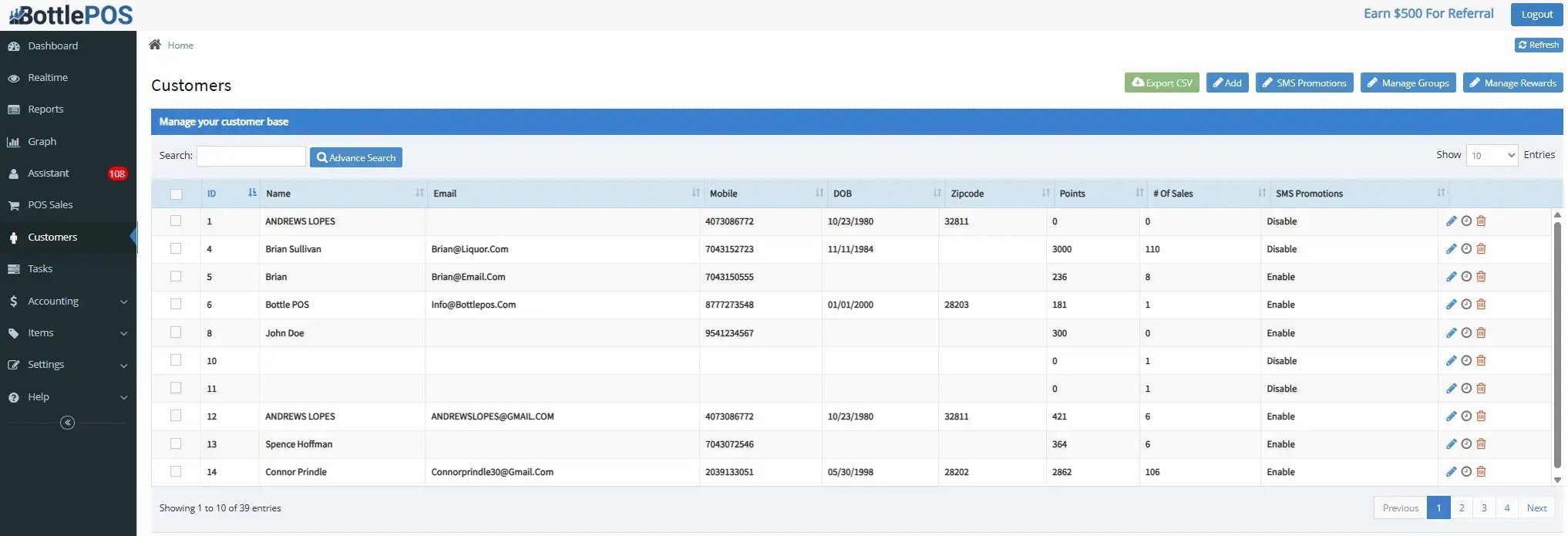
These reports typically show each customer’s name, contact details, number of sales, purchase history, and loyalty points balance — all of the raw material you’ll use to build meaningful segments.

Step 3: Identify Behavioral Patterns
Armed with this data, you can filter and sort your customer list to spot trends.
Here are some examples of how you might view this data:
- Who shops at least twice per month?
- Who spends above your store’s average ticket?
- Who buys mostly discounted products?
- Who consistently buys from premium categories?
- Who purchases across multiple categories versus sticking to one?
Asking these types of questions helps you divvy up shoppers into one of the three categories mentioned above.
For instance, a customer who shops weekly, rarely uses coupons, and spends above average likely fits your “VIP” segment. Compare this data to a customer who shops during promo periods and buys mostly discounted items — they likely fit your “bargain hunter” segment.
To make this process easier, Bottle POS offers an intuitive A–D ranking system that organizes customers by purchase frequency, spend, and loyalty engagement, so you can quickly see which shoppers fit into each group.
Step 4: Create Marketing Campaigns for Each Segment
Now’s the most important part — acting on this data with dedicated marketing efforts.
If you use a system like Bottle POS, built-in promotions and SMS tools let you send targeted offers to specific groups rather than blasting the same message to everyone.
Here’s a quick comparison chart of how to frame messaging and deals to each group.
| Customer Segment | Motivations | Marketing Tips | Example Offers |
|---|---|---|---|
| VIPs |
|
|
|
| Bargain hunters |
|
|
|
| Explorers |
|
|
|
These efforts should help clarify how your customers like to shop at your store and how you can best appeal to their unique interests.
Related Read: Alcohol Marketing Strategies: 6 Expert Tips To Help You Sell More
For example, let’s say you want to create a campaign that appeals to your “explorer” segment.
If you only push promotional messaging about bestsellers, you’ll likely miss out on their business. Instead, these folks respond better to messaging that emphasizes new products, seasonal items, and limited releases.
Step 5: Review Performance and Improve
Once your campaigns are up and running, you’re not finished there. You need to measure marketing effectiveness and refine your approach over time.
Set a review schedule (monthly is a good starting point, or weekly during busy periods) and pull POS metrics that tie back into each segment. Focus on redemption rates, purchase frequency, basket size, and category spend to see how each group responds to your offers.
Related Read: Liquor Store Analytics and Reporting: 4 Metrics You Should Track
Then, you can compare performance across your three customer segments. Which campaigns are driving the most repeat visits, and which offers fall flat? These insights are what help you adjust messaging, timing, or offer type.
Throughout this process, remember to keep customer data up to date by continuing to capture phone numbers and opt-ins at checkout. Train staff on how to consistently collect this information and handle it politely, so customers feel comfortable sharing it.
The more accurate your profiles, the easier it is to spot trends, refine segments, and make each campaign more relevant.
Customer Segmentation FAQs
Even with a solid process in place, questions often come up when liquor store owners start using POS data to segment customers.
The answers below cover common challenges and practical tips to help you make the most of your segments.
Q: A few customers have hesitated to share their info at checkout. What do I do?
- Some shoppers are cautious about giving phone numbers or joining loyalty programs. Make it clear that providing a number earns points, rewards, or early access — framing it as a benefit rather than a requirement encourages opt-ins.
Q: What if my store doesn’t have all three core customer segments?
- Not every store sees a balanced mix of VIPs, bargain hunters, and explorers. Instead, focus on the segments you do have while occasionally highlighting offers to smaller groups, like a limited release for explorers.
Q: Are there other types of customers to consider?
- Some stores see niche behaviors beyond the three main groups, like gift shoppers, collectors, or local-focused buyers. Your POS can still track these profiles the same way, letting you target campaigns for smaller segments.
Q: How can I reach customers beyond the physical store?
- Use email, SMS, or e-commerce integrations to engage shoppers who browse or buy online. Even minimal online visibility can capture new buyers and encourage repeat visits.
Q: How often should I revisit my segments?
- Customer behavior changes over time, so check POS metrics monthly. Review metrics like basket size, category spend, and redemption rates — then adjust campaigns to keep messaging relevant and segments distinct.
Get the Right Tools for Liquor Customer Segmentation
Using customer data to guide your marketing has never been more relevant than it is in 2026.
With an industry-specific POS, you can record purchases and create targeted promotions for each segment without spending hours manually labeling customers in spreadsheets.
Attempting this without the right tools can feel impossible, but a POS system like Bottle POS includes exactly what liquor retailers need — customer history, A–D ranking, loyalty tracking, reporting, e-commerce integrations, and promotional support — without extra features that get in the way.
If you want to see how this looks in practice, use our free Build & Price tool to design a POS setup that perfectly aligns with your liquor store’s size, needs, and budget.

With 20 years in retail — 10 in the liquor industry — Kevin Patel has seen it all. A liquor store owner himself, Kevin wants to give other small business owners the technology to compete with big box stores. Kevin writes extensively about profits, marketing, and inventory management — three topics he believes every liquor store owner should learn about. "I built Bottle POS to make enterprise tools, mobile inventory, and cloud technology affordable so independent stores can compete with big chains."