




The Full Pour: Recapping the Bottle POS Retail Liquor Summit 2026
Managing inventory for a wine store can feel a lot like you’re physically juggling all those bottles!
You need to track stock levels, keep customers' favorite wines on hand, make room for new options, avoid overstocking, and stay ahead of seasonal shifts — all at once.
Every retail store's profitability comes down to product in, product out. When a whole category of wine isn't selling, that's a red flag worth investigating.
We've worked with hundreds of wine store owners and seen firsthand what changes once they put a solid inventory system in place: less waste, fewer stockouts, and happier customers.
This guide covers why wine stores need a dedicated inventory system, best practices for managing your stock, the features to look for, and a comparison of the top wine inventory software solutions available today.
In this guide:
- What is a wine inventory system, and why does your shop need one?
- 5 must-have features in wine inventory software
- Top wine inventory software solutions
- Getting more out of your wine inventory system
- Frequently asked questions
What Is a Wine Inventory System, and Why Does Your Shop Need One?
Wine inventory software is a tool built to track stock levels, vintages, and sales trends specifically for wine retailers. Unlike a generic inventory system, it's designed around the way wine actually moves through a shop — by case, by bottle, by vintage, and by region.
Wine shops face inventory challenges that a t-shirt store never will. The product is expensive and fragile, requires specific storage conditions, and comes with legal requirements around sale and record-keeping that vary by state. A dedicated wine inventory system helps you manage all of it in one place, and it typically pays off in a few concrete ways:
- Fewer stockouts and less overstock: Real-time tracking and reorder alerts mean you restock bestsellers before they sell out, without tying up cash in bottles that sit on the shelf.
- Better organization: Sorting by variety, vintage, and region makes it easier for you, your staff, and your customers to find what they're looking for.
- Smarter purchasing: Sales data reveals demand trends, so you can plan for seasonal shifts and buy accordingly instead of guessing.
- Easier compliance: Many state alcohol regulations require detailed inventory records. A dedicated system keeps that documentation ready if you're ever audited.
- Less manual work: Automated data entry and invoicing save hours compared to spreadsheets or paper logs, and many systems offer remote access so you can check in from anywhere.
- Higher margins: Knowing what customers actually buy — and cutting back on what they don't — helps you stock smarter and keep more of every sale.
Running a wine shop on instinct alone gets expensive fast. The right inventory system takes the guesswork out, so you can focus on the parts of the business only you can do.
5 Must-Have Features in Wine Inventory Software
Wine shops typically carry more SKUs and more variation than the average retailer, so a general-purpose inventory tool often falls short. Here's what to look for instead:
- Reporting and analytics: Detailed reports on sales trends and inventory levels help you see more than just a running tally of what's left.
- Cloud access: Most modern wine inventory platforms include a mobile app or cloud dashboard so you can check stock from anywhere with an internet connection.
- Loyalty program integration: A system with built-in loyalty tools lets you run targeted campaigns that keep your best customers coming back.
- Shrinkage and loss tracking: Real-time tracking and automated alerts help you catch theft, breakage, or other discrepancies before they add up.
- Age verification: Point of sale (POS) age checks help you stay compliant and avoid fines for underage sales.
Beyond features, prioritize a provider with strong customer support — you'll want quick answers when you're configuring the system or troubleshooting an issue.
Top Wine Inventory Software Solutions
Here's how the leading wine inventory platforms compare.
1. Bottle POS
.png?width=900&height=348&name=BPOS%20Blog%20Refresh%20Wine%20Inventory%20System%20Bottle%20(1).png)
Bottle POS is an all-in-one point of sale and inventory management system designed specifically for wine retailers. We've worked with hundreds of wine shops and liquor stores, giving us the industry experience to offer the perfect hardware, software, and support for your wine store's success.
Top features:
- Extensive product database: A centralized database of 60,000+ wine and liquor products cuts down on manual data entry.
- Case breaking: Built-in case break tracking keeps every bottle accounted for, even when a case gets broken up.
- AI-powered sales analytics: The system ranks and color-codes products A–D based on sales patterns, so you can spot top sellers and slow movers at a glance.
- Automated inventory receiving: Auto invoicing lets you review and finalize incoming shipments without entering them by hand.
- Dual pricing: Cash-paying customers get a discount, while card-paying customers cover the processing fee.
- Loyalty and rewards: Built-in loyalty tools encourage repeat business.
- Built-in integrations: The system connects with DoorDash for delivery, Fintech for invoicing and receiving, and QuickBooks for accounting — no manual syncing required.
Pricing: Plans start at $59/month (Starter), with Growth ($79/month) and Premium ($99/month) tiers that include hardware, a two-year warranty, and a free pinpad. Get a custom quote with our Build and Price tool.
Rating: 4.4 on Capterra
2. mPower Beverage
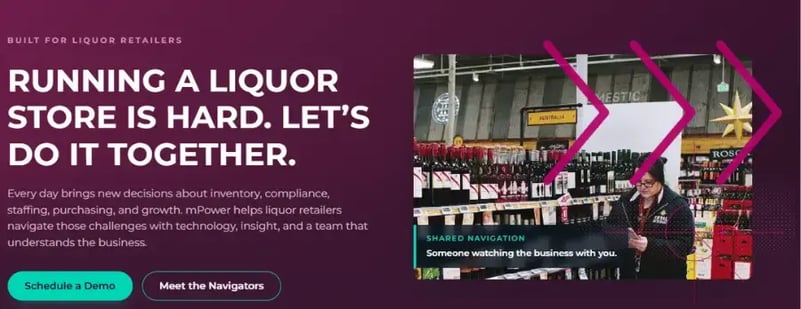
mPower Beverage is POS software for beer, wine, and liquor retailers, built by a team with a background in beverage retail.
Top features:
- Intelligent ordering and transfers: Alerts are based on business metrics like selling velocity by location.
- Data integrations: The mPower team helps migrate data from your existing system and integrates with Drync, Drizly, Pricer, Fintech, and QuickBooks.
- Automated reporting: Schedule daily sales, weekly exception, and monthly comparison reports.
Pricing: Costs start at $1,000 upfront plus $120/month per register, and require one of mPower's integrated payment processing partners.
Rating: 4.1 on Capterra
For a more detailed comparison, check out: mPower Beverage vs. Bottle POS: Which is best for your liquor store?
3. Lightspeed
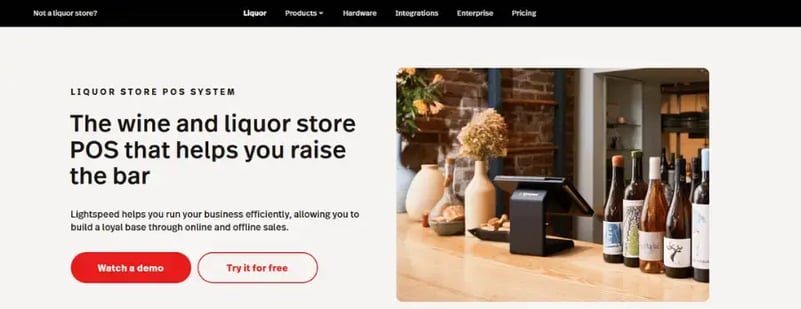
Lightspeed is built for enterprise-level liquor stores and wine shops, along with other retail categories like restaurants and golf courses.
Top features:
- Efficient checkout: Quick Keys, product lookups, and automatic age-verification prompts speed up the register.
- Unified commerce: The platform unifies in-store, online, and click-and-collect or local delivery sales in one place.
- Reporting and analytics: Real-time reports cover sales, inventory, customers, and employees, with mobile access and customization by time frame, product, or customer segment.
Pricing: Plans start at $89/month (Basic, billed annually) and scale up to $289/month for Plus. Build a custom quote on Lightspeed's pricing page.
Rating: 4.0 on Capterra
For a more detailed comparison, check out: Lightspeed vs. Bottle POS: Which is the best liquor store POS for you?
4. Spirits POS
Spirits POS is built exclusively for wine, liquor, and beverage alcohol retailers rather than adapted from a generic POS platform.
Top features:
- Product categorization: Spirits sorts products by producer, region, varietal, vintage, and more, so customers can find what they want.
- Intelligent ordering: The system bases reorder recommendations and transfer alerts on current sales velocity.
- Data integration: Spirits preloads wine and spirit products and integrates with QuickBooks.
- Remote reporting: The system generates automated reports on sales, discounts, and inventory movement, with remote back-office access.
Pricing: Contact their sales team for a custom quote.
Rating: 52/100 on Crozdesk
For a more detailed comparison, see: Make an Informed Decision: Bottle POS vs. Spirits 2000 POS
5. KORONA POS
.png?width=900&height=348&name=BPOS%20Blog%20Refresh%20Wine%20Inventory%20System%20KORONA%20(1).png)
KORONA POS offers cloud-based POS that works well for multi-store chains and larger businesses, alongside quick-service and ticketing use cases outside retail.
Top features:
- Advanced inventory tracking: Inventory management features allow you to monitor stock levels across multiple locations in real time, with automated reorder alerts built in.
- Integrated tastings and table service: Handle wine tastings, bottle sales, and restaurant table service in one system.
- Custom delivery workflows: The system lets you build delivery processes tailored to your shop, from order intake to fulfillment.
Wine shops that also serve wine by the glass in store or are attached to a restaurant may get the most out of KORONA POS.
Pricing: Plans start at $59/month per terminal (Core), with Retail and Plus tiers up to $99/month. No added transaction fees beyond your processor's.
Rating: 4.7 on Capterra
For a more detailed comparison, see: KORONA POS vs. Bottle POS: Which is best for your liquor store?
6. InVintory
.png?width=900&height=348&name=BPOS%20Blog%20Refresh%20Wine%20Inventory%20System%20Invintory%20(1).png)
InVintory is a wine cellar app built for collectors, not retailers — but it can suit a boutique wine shop with a small, curated selection.
Top features:
- Bottle location tracking: The app keeps detailed records of which bottles are stored in which cellars and coolers.
- Bottle notes: InVintory lets you add custom notes on each bottle's flavor, food pairings, and origin, so you can educate customers and make expert recommendations.
- Unlimited bottles and tags: The app places no limit on the number of bottles or tags you can add, so your records can grow along with your offerings.
Pricing: Free plan available, with Premium priced at $14.95/month or $149.99/year.
Rating: 4.8 on the App Store
7. InnoVint
.png?width=900&height=348&name=BPOS%20Blog%20Refresh%20Wine%20Inventory%20System%20Innovint%20(1).png)
InnoVint is built for fully functional wineries, which face inventory challenges most retailers don't.
Top features:
- Vineyard management: Track grape yields and forecast production from your harvests.
- Wine production: Monitor how much wine is in your cellars and tanks and what it's worth.
- Case-bottle tracking: Keep a running count of how many bottles and cases of each wine you have in stock.
Pricing: Available by request only; a free trial is offered with no credit card required.
Rating: 4.6 on Capterra
Getting More Out of Your Wine Inventory System
Software helps, but how you use it matters just as much. A wine inventory system does more than track what's on the shelf — used well, it protects your cash flow, saves you time, and helps you stock smarter. Here are the habits that make the biggest difference:
- Keep accurate records. Track what's in stock, how much of it, and where it's stored. Inventory management software makes this far easier than a spreadsheet.
- Categorize your inventory and stock what sells. Group wines by type, region, or grape variety, so you, your staff, and your customers can find what you're looking for. Then, use sales reports to see which bottles are moving and which are gathering dust — Bottle POS, for example, grades each wine A through D based on sales performance, so you know exactly what to stock more, and less, of.
- Rotate your stock. Move older bottles to the front of displays and newer ones to the back. This keeps what you're selling fresh and cuts down on spoilage.
- Monitor stock levels in real time and automate restocking. Don't wait for a weekly count. A system with live dashboards or mobile access catches fast-depleting items and discrepancies as they happen, and lets you set a minimum threshold for bestsellers so purchase orders generate automatically instead of waiting for an empty shelf. Reorder alerts and historical data also help you forecast demand — stockouts send customers to your competitors, and overstocking ties up cash in bottles that won't sell.
- Train your staff. Make sure every staff member knows the system inside and out. This keeps checking inventory, rotating bottles, restocking shelves, and finding what a customer's asking for quick and consistent, no matter who's on the floor.
Put these together, and your wine inventory system pays for itself twice over: once in the cash you no longer tie up in overstock, and again in the hours you no longer spend on manual counts and reorders.
Frequently Asked Questions About Wine Inventory Software
- What is a wine inventory system? Software built to track wine stock levels, vintages, and sales trends in real time, helping wine shops reorder at the right time, cut down on waste, and stay compliant with alcohol sales regulations.
- How much does wine inventory management software cost? Pricing varies by provider and business size. Liquor and wine-focused platforms typically run $59–$180/month for small to mid-sized stores. Enterprise or winery-level systems can start in the thousands.
- What's the difference between wine inventory software and a generic inventory system? Wine inventory software is built for the beverage alcohol industry, with features like vintage and varietal tracking, case-break inventory, age verification, and compliance reporting that generic tools usually don't offer.
- Can wine inventory software integrate with my point of sale system? Most dedicated platforms, including Bottle POS, combine inventory and point of sale in one system, so sales automatically update stock counts. Standalone tools can also integrate with separate POS and accounting software.
- Is wine inventory software worth it for a small wine shop? Yes. Even single-location shops benefit from automated reordering, fewer stockouts, and less time spent on manual counts. Providers like Bottle POS and KORONA POS offer entry-level plans priced for single-register stores.
- What's the best wine inventory software? It depends on your shop's size and needs. Single-location wine and liquor shops often do best with an all-in-one, liquor-specific platform like Bottle POS, while multilocation retailers or wineries may prefer Lightspeed, KORONA POS, or InnoVint.
- How do I switch from a generic POS to wine-specific inventory software? Most providers offer data migration to import your existing product, vendor, and customer records. Look for one that preloads a wine and liquor product database, and plan the switch during a slower sales period to limit disruption.
Take Control of Your Wine Store Inventory
The right inventory software can help you sell more wine and hold onto more of the profit. Bottle POS gives you a centralized product database, automated invoicing, and sales grading, so you always know what's in stock and what to reorder.
Better visibility and less manual paperwork add up to more time spent running your store and less time managing spreadsheets. If you're ready to see it in action, schedule a software demo today.

With 20 years in retail — 10 in the liquor industry — Kevin Patel has seen it all. A liquor store owner himself, Kevin wants to give other small business owners the technology to compete with big box stores. Kevin writes extensively about profits, marketing, and inventory management — three topics he believes every liquor store owner should learn about. "I built Bottle POS to make enterprise tools, mobile inventory, and cloud technology affordable so independent stores can compete with big chains."